Data Structure

Python data structures, NumPy arrays, Pandas DataFrames, wide and long formats, and tidy data principles.
Author

John Robin Inston

Published

May 6, 2026

Modified

May 6, 2026

ImportantLearning Objectives
  • Understand Python’s built-in data types and the limitations of native data structures.
  • Work with NumPy arrays and Pandas DataFrames.
  • Load tabular data from .csv and .xlsx files.
  • Distinguish between wide and long data formats and convert between them using pd.melt and pd.pivot.
  • Apply the tidy data standard to assess and clean real-world datasets.

Data in Python

Python Variables

Python is a general purpose programming language. It natively stores data in variables of different types:

  • Strings (str) — text data.
  • Integers (int) — whole numbers.
  • Floating point numbers (float) — decimal numbers.
  • Booleans (bool) — true/false values.
  • Lists (list) — ordered collections of data.
  • Dictionaries (dict) — key-value pairs.
  • Tuples (tuple) — ordered, immutable collections of data.
  • Sets (set) — unordered collections of unique data.

Packages such as pandas and numpy provide additional data types optimised for data analysis:

  • Pandas DataFrames (.DataFrame) — tabular data.
  • NumPy arrays (.array) — numerical data.

Built-in Data Types

my_string = "Hello, World!"
my_integer = 10
my_float = 3.14
my_boolean = True
my_list = [1, 2, 3, 4, 5]
my_tuple = (1, 2, 3, 4, 5)
my_set = {1, 2, 3, 4, 5}
my_dict = {"name": "John", "age": 30}

item_list = [my_string, my_integer, my_float, my_boolean,
             my_list, my_tuple, my_set, my_dict]

for item in item_list:
    print(type(item), ":", item)
<class 'str'> : Hello, World!
<class 'int'> : 10
<class 'float'> : 3.14
<class 'bool'> : True
<class 'list'> : [1, 2, 3, 4, 5]
<class 'tuple'> : (1, 2, 3, 4, 5)
<class 'set'> : {1, 2, 3, 4, 5}
<class 'dict'> : {'name': 'John', 'age': 30}

Built-in data types have limitations for data analysis:

  • Scalability — inefficient memory usage at scale.
  • Functionality — no support for vector operations or tabular manipulation.

For example, adding a scalar to a list raises a TypeError:

my_list + 2
---------------------------------------------------------------------------
TypeError                                 Traceback (most recent call last)
Cell In[47], line 1
----> 1 my_list + 2

TypeError: can only concatenate list (not "int") to list

NumPy Arrays

NumPy arrays are \(n\)-dimensional arrays of homogeneous data. They support:

  • Vectorized operations — element-wise arithmetic without explicit loops.
  • Efficient memory usage — stored as contiguous blocks of typed data.

Make sure you are familiar with the basics of NumPy arrays: construction (array, linspace, full), indexing and slicing, and broadcasting.

import numpy as np

list_array = np.array([1, 2, 3, 4, 5])
linspace_array = np.linspace(0, 1, 5)

print(list_array)
print(linspace_array)

print(list_array[:3])
print(linspace_array[list_array > 2])
[1 2 3 4 5]
[0.   0.25 0.5  0.75 1.  ]
[1 2 3]
[0.5  0.75 1.  ]

Pandas DataFrames

What is Pandas?

Pandas is a library for data manipulation and analysis built on top of NumPy. It provides data structures and functions for working with tabular data.

Pandas DataFrames are 2-dimensional tabular data structures with labeled rows and columns. They are similar to NumPy arrays but with labeled axes, and similar to dictionaries but with labeled columns.

import pandas as pd

data = pd.DataFrame({
    "name": ["John", "Jane", "Jim", "Jill"],
    "age": [20, 21, 22, 23],
    "city": ["New York", "Los Angeles", "Chicago", "Houston"]
})

print(data)
   name  age         city
0  John   20     New York
1  Jane   21  Los Angeles
2   Jim   22      Chicago
3  Jill   23      Houston

Loading Data Files

Data Formats

In PSTAT100 we primarily use tabular data stored in the following formats:

  • Text files (.txt) — simplest format but with loading challenges.
  • Comma Separated Values (.csv) — most common format.
  • Tab Separated Values (.tsv) — similar to CSV but uses tabs as delimiters.
  • Excel files (.xlsx) — spreadsheets with complex formulas and formatting.

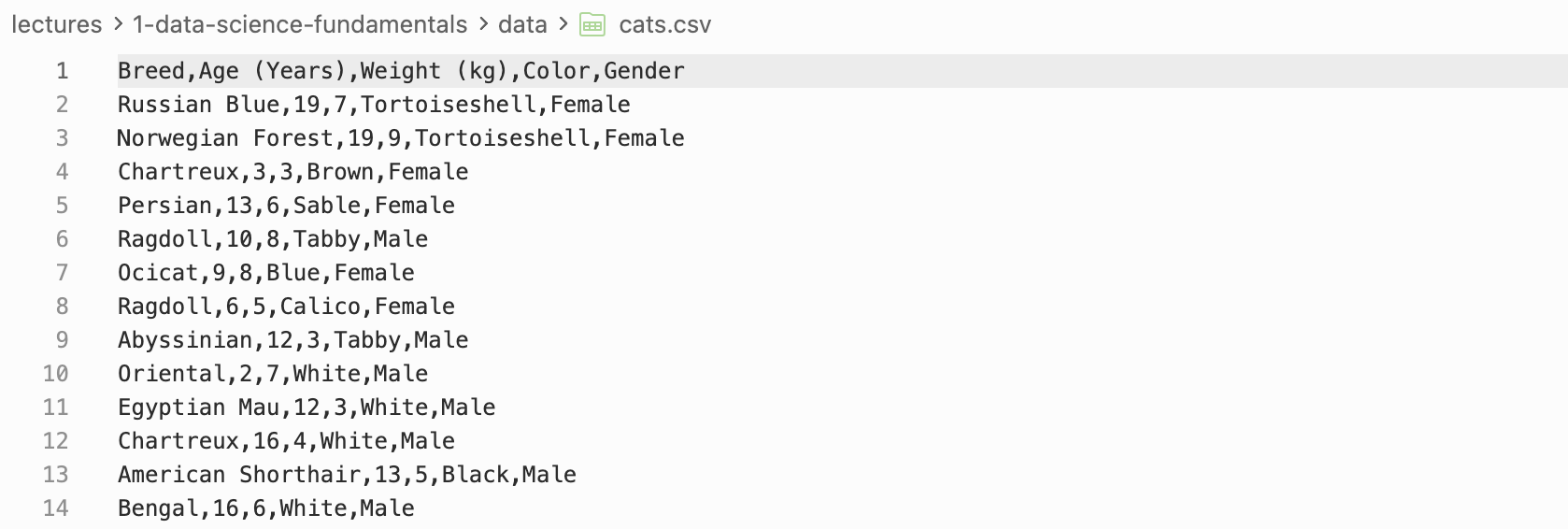
Example of a CSV file

Loading .csv Files

.csv files store tabular data as plain text with comma-separated values. Use pd.read_csv to load them.

cats_data = pd.read_csv("data/cats.csv")
print(cats_data.head())
              Breed  Age (Years)  Weight (kg)          Color  Gender
0      Russian Blue           19            7  Tortoiseshell  Female
1  Norwegian Forest           19            9  Tortoiseshell  Female
2         Chartreux            3            3          Brown  Female
3           Persian           13            6          Sable  Female
4           Ragdoll           10            8          Tabby    Male

Loading .xlsx Files

.xlsx files are Excel spreadsheets. Use pd.read_excel to load them, specifying the sheet name where needed.

sales_data = pd.read_excel(
    "data/office_sales.xlsx",
    sheet_name="SalesOrders")
print(sales_data.head())
   OrderDate   Region      Rep    Item  Units  Unit Cost   Total
0 2024-01-06     East    Jones  Pencil     95       1.99  189.05
1 2024-01-23  Central   Kivell  Binder     50      19.99  999.50
2 2024-02-09  Central  Jardine  Pencil     36       4.99  179.64
3 2024-02-26  Central     Gill     Pen     27      19.99  539.73
4 2024-03-15     West  Sorvino  Pencil     56       2.99  167.44

DataFrame Basics

Manipulation and Indexing

There are many ways to manipulate DataFrames:

  • Finding information: columns, index, shape, head, tail.
  • Indexing and filtering: .loc, .iloc.
  • Adding and removing columns and rows: .drop, .dropna, .insert, pd.concat.
  • Sorting: .sort_values, .sort_index.
print(cats_data.columns)
print(cats_data.index)
print(cats_data.shape)
Index(['Breed', 'Age (Years)', 'Weight (kg)', 'Color', 'Gender'], dtype='str')
RangeIndex(start=0, stop=1000, step=1)
(1000, 5)
print(cats_data[["Breed", "Color"]].head())
print(cats_data.iloc[3:5])
              Breed          Color
0      Russian Blue  Tortoiseshell
1  Norwegian Forest  Tortoiseshell
2         Chartreux          Brown
3           Persian          Sable
4           Ragdoll          Tabby
     Breed  Age (Years)  Weight (kg)  Color  Gender
3  Persian           13            6  Sable  Female
4  Ragdoll           10            8  Tabby    Male
cats_data_dropped = cats_data.drop(columns=["Color"])
print(cats_data_dropped.columns)
Index(['Breed', 'Age (Years)', 'Weight (kg)', 'Gender'], dtype='str')

Data Structure

Wide and Long Formats

Often two datasets can represent the same information in different data structures. These can be broadly categorised as:

Wide data structure:

  • One row per subject.
  • Repeated measurements are in separate columns.

Long data structure:

  • One row per measurement.
  • A separate column identifies which variable was measured.

Wide vs Long Data Structures

Wide Data Structure

To build intuition, consider a dataset of points, assists, and rebounds for four basketball teams (adapted from Luke Bennett).

basketball_data = pd.DataFrame({
    "team": ["A", "B", "C", "D"],
    "points": [88, 91, 99, 94],
    "assists": [12, 17, 24, 28],
    "rebounds": [22, 28, 30, 31]
})
basketball_data.set_index("team")
Basketball Data — Wide Format
points assists rebounds
team
A 88 12 22
B 91 17 28
C 99 24 30
D 94 28 31

Each observation (team) occupies its own row, and each measurement type is in a separate column — this is the wide format.

Long Data Structure

The same data in a long format places each individual measurement on its own row, with a column identifying which variable was measured.

Basketball Data — Long Format
statistic value
team
A points 88
A assists 12
A rebounds 22
B points 91
B assists 17
B rebounds 28
  • Each measurement has its own row (value).
  • A column identifies which variable was measured (statistic).

Wide vs Long — Which Is Better?

Neither format is universally better; the appropriate choice depends on context:

  • Wide data is more human-readable and common in spreadsheets.
  • Long data is more computer-readable:
    • Required by most plotting libraries (seaborn, ggplot in R).
    • Easier to filter, group, and aggregate in pandas.

It is therefore important to be able to convert between the two formats.

pd.melt — Wide → Long

pd.melt converts a wide DataFrame to a long DataFrame. Its key arguments are:

  • id_vars — columns that identify the subject (kept as-is).
  • var_name — name for the column that will hold the former column names.
  • value_name — name for the column that will hold the values.
basketball_data_long = basketball_data.melt(
    id_vars=["team"],
    var_name="statistic",
    value_name="value"
)
print(basketball_data_long)
   team statistic  value
0     A    points     88
1     B    points     91
2     C    points     99
3     D    points     94
4     A   assists     12
5     B   assists     17
6     C   assists     24
7     D   assists     28
8     A  rebounds     22
9     B  rebounds     28
10    C  rebounds     30
11    D  rebounds     31

pd.pivot — Long → Wide

pd.pivot converts a long DataFrame back to a wide DataFrame. Its key arguments are:

  • index — column to use as row identifiers.
  • columns — column whose values become the new column names.
  • values — column whose values fill the cells.
basketball_data_wide = basketball_data_long.pivot(
    index="team",
    columns="statistic",
    values="value"
)
print(basketball_data_wide)
statistic  assists  points  rebounds
team                                
A               12      88        22
B               17      91        28
C               24      99        30
D               28      94        31

The Lack of a Standard Format

Most data is stored in a layout that made intuitive sense to the creator — idiosyncratic and unprincipled, with few widely used conventions and lots of variability in practice.

This creates two interdependent choices for data scientists:

  • Representation: how to encode information (e.g. dates as one variable or three? Ordinal values as numbers or labels?).
  • Form: how to display information (wide or long? one table or many?).

The tidy data standard was introduced to resolve this inconsistency by providing a principled set of rules for structuring datasets.

Tidy Data

Tidy Data Principles

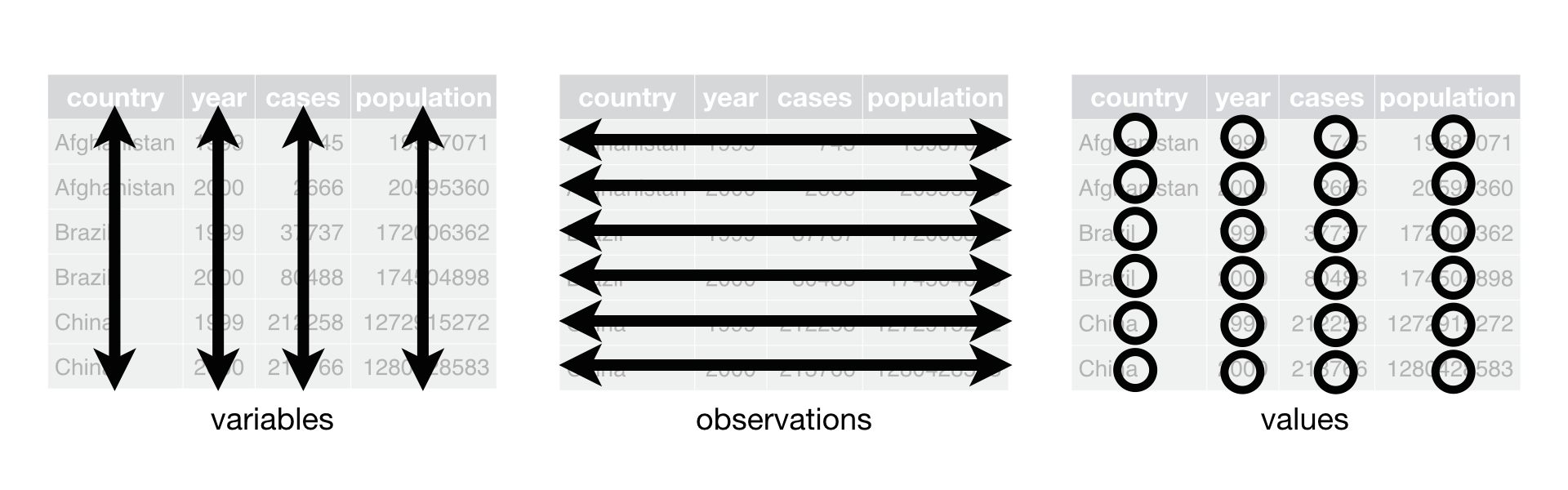
“Tidying your data means storing it in a consistent form that matches the semantics of the dataset with the way it is stored. In brief, when your data is tidy, each column is a variable, and each row is an observation.” — Wickham and Grolemund, R for Data Science, 2017.

A dataset has both:

  • Semantics: the meaning of each value.
  • Structure: how values are arranged.

The tidy standard aligns data semantics with data structure.

The Tidy Data Standard

ImportantTidy Data Standard

For data to be tidy, it must satisfy three rules:

  1. Each variable is a column.
  2. Each observation is a row.
  3. Each type of observational unit forms a table.

Tidy Data

Example 1 — GDP Growth Data

Consider World Bank data on annual GDP growth:

gdp = pd.read_csv(
    "data/annual_growth.csv",
    encoding="latin1"
)
print(gdp.shape)
gdp.head()
(264, 61)
Country Name Country Code 1961 1962 1963 1964 1965 1966 1967 1968 ... 2010 2011 2012 2013 2014 2015 2016 2017 2018 2019
0 Aruba ABW NaN NaN NaN NaN NaN NaN NaN NaN ... -3.685029 3.446055 -1.369863 4.198232 0.300000 5.700001 2.100000 1.999999 NaN NaN
1 Afghanistan AFG NaN NaN NaN NaN NaN NaN NaN NaN ... 14.362441 0.426355 12.752287 5.600745 2.724543 1.451315 2.260314 2.647003 1.189228 3.911603
2 Angola AGO NaN NaN NaN NaN NaN NaN NaN NaN ... 4.403933 3.471976 8.542188 4.954545 4.822628 0.943572 -2.580050 -0.147213 -2.003630 -0.624644
3 Albania ALB NaN NaN NaN NaN NaN NaN NaN NaN ... 3.706892 2.545322 1.417526 1.001987 1.774487 2.218752 3.314805 3.802197 4.071301 2.240070
4 Andorra AND NaN NaN NaN NaN NaN NaN NaN NaN ... -1.974958 -0.008070 -4.974444 -3.547597 2.504466 1.434140 3.709678 0.346072 1.588765 1.849238

5 rows × 61 columns

To assess whether this is tidy, we compare semantics with structure:

Semantics Structure
Observations: Annual country records Rows: Countries
Variables: GDP growth and year Columns: Values of year
Observational units: Countries Tables: Just one

❌ Rules 1 and 2 are violated — column names are values (years), not variables. This dataset is not tidy.

Making the GDP Data Tidy

We need to:

  1. Set the index to Country Name using set_index.
  2. Drop the superfluous Country Code column using drop.
  3. Melt the data so that year and growth_pct are variables using melt.
  4. Sort by year and country using sort_values.
gdp_tidy = gdp.set_index(
    "Country Name"
).drop(
    columns="Country Code"
).melt(
    var_name="year",
    value_name="growth_pct",
    ignore_index=False
).reset_index(
).sort_values(
    ["year", "Country Name"]
).set_index("Country Name")

gdp_tidy.head()
year growth_pct
Country Name
Afghanistan 1961 NaN
Albania 1961 NaN
Algeria 1961 -13.605441
American Samoa 1961 NaN
Andorra 1961 NaN

Now we can verify:

Semantics Structure
Observations: Annual country records Rows: Annual country records
Variables: GDP growth and year Columns: GDP growth and year
Observational units: Countries Tables: Just one

✅ All three rules are satisfied. The data is now tidy.

Back to top